Posts

Cloud Foundry Manifests and multi-instance deployments

Image
In a previous post we saw the basic usage of " cf push " to bring your Python script to Pivotal Cloud Foundry and running it. The only parameter we used at the time was the application name. If for example we did: cf push pretty_app1 This meant that our app would be accessible with " http://pretty_app1.cfapps.io ". Not to be confused with the name of the actual Python script, ex: " app.py " When we run this we got an instance with a certain default characteristics, ie  1GB RAM and 1GB of disk. Given that Pivotal bills you based on the memory used by your apps, you might want to be more specific about that, specially in our "hello world" app which requires little resources. You can see the health of your app as follows. In my case we can see it only requires 17MB of RAM, so 1GB is a huge waste. Luckily the " cf " cli tool has lots of options. You can explore them by simply typing " cf --help " or to see the opt...

How to get started in Deep Learning

Image
Nowadays there are so many hot new technologies that is getting hard to sleep at night. One of those technologies I have been recently looking into is Deep Learning. During the process I have come across some pretty good resources which are worth sharing. If DL is something you want to explore tune in. What I am recommending here can be done over a weekend. That investment will certainly not turn you into a seasoned Data Scientist but you will get enough to be dangerous. From the outside it looks like a harsh topic but what I have found is that when explained right it is not the "mission impossible" that looks from the outside Deep Learning refers to the use of Neural Networks with several hidden layers. That's what make it "deep". So for me the logical place to start is Neural Networks, in particular try to understand the concepts. While trying to do just that I have come across this amazing channel in Youtube called “3Blue1Brown”. I don't know how els...

Cloud Foundry High Availability features

Image
Cloud Foundry has several High Availability features which are essential on an Enterprise application platform. We can classify them into two categories depending on at what level they are implemented. Elastic Runtime features. These are features that are implemented at the application instance level Availability Zones. Administrators can define multiple Availability Zones which typically correspond to chunks of the infrastructure that are independent from each other, such as different physical servers sitting on a separate racks with different power sources, etc. When you define an application with multiple instances, Cloud Foundry automatically distributes the app across the available Availability Zones. This ensures that if an AZ goes down either accidentally or during maintenance the app can keep running App instance fails. Diego sends "heartbeat" messages to the "Health Manager" component of the platform. If the "actual state" is different f...

Intro to Redfish API on Dell servers

Image
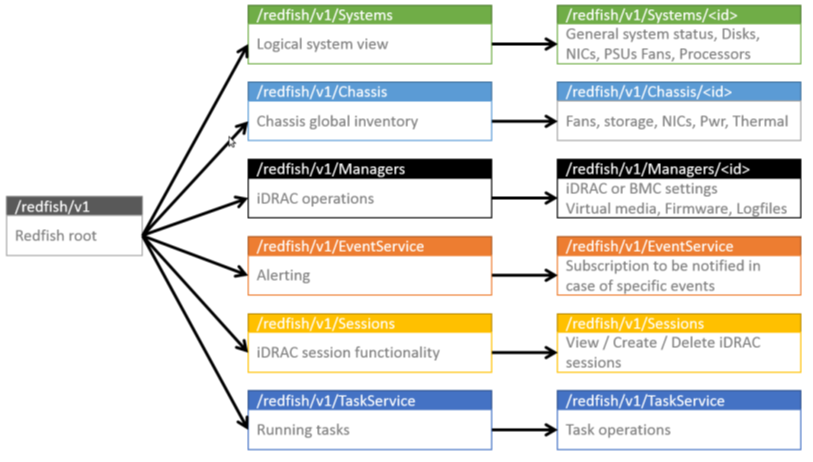
With the advent of public cloud organisations of all sizes are more and more looking to implement the same agile operational models that the hyper-scale cloud providers offer. As we would say "cloud is not a destination but an operational model". To this end we have seen in the last few years a proliferation of RESTful API's to manage pretty much everything in the infrastructure world. In particular the Redfish API is the joint effort by all server manufacturers to provide an API through which to consistently manage any vendors hardware. This resulted in a DMTF industry standard Dell servers have traditionally managed through the OpenManage tool or through the iDRAC and its "racadm" command line tools. The adoption of the Redfish API with 13G servers fitted with the "DRAC with Lifecycle Controller" offered a complete different approach. The root of the API is accessed through the iDRAC as follows: https://<iDRAC IP>/redfish/v1/ The Red...

AWS Lambda hands-on with Python

Image
Serverless and Function-as-a-Service are not new concepts but they have become very popular since AWS launch Lambda in 2015. The objective of this post is to provide you with some guidance so you can experience it for yourself. So we will do a very quick introduction and explore the pros and cons and jump straight into the hands-on. The idea is that you create a function on your language of choice which is then run on a container when triggered by an event. The word serverless comes from the fact that you only worry about the code, ie you don't have to manage the server, the container, the virtual machine or whatever it is running on. From that point of view PaaS is "serverless" as well, hence Function-as-a-Service is perhaps a better term. The difference between PaaS and FaaS is that with PaaS your unit of deployment is the full microservice (which is likely to contain several functions), whereas in FaaS it is only a function. FaaS leverages the speed at which cont...

PKS Harbor in action

Image
In the previous post we introduced PKS (Pivotal Container Services) and showed a video that illustrated how easy it is to deploy by using Pivotal Ops Manager. Both the video and the post were well received but our colleagues and partners. Some of them have shown interest in the Harbor component and that is precisely what we are going to cover today. Harbor is an enterprise-class registry for Docker images. It offers improved security, high availability and performance when compared to most choices out there. Let's look at each of those in detail. SECURITY On-prem. Chances are that you are packaging your own code and even other pieces of intellectual property inside your container images for easier, faster deployment. If you do and you feel nervous about storing your container images in an online registry service like Docker Hub, let me say it, you are not the only one. As much as we all love the flexibility of cloud services, there are some risks involved and every day t...

PKS in Action

Image
Now it is a good time to develop an interest in container technology. Nowadays when we think about containers, Docker comes right to mind. Containers is not a new technology. It has been available in Linux in various shapes and forms for a number of years. The real merit of Docker is how super easy it made to package and distribute software along with its dependencies and hence its popularity. However many people started to wonder if it could be taken one step further. I like to compare Docker with VMware Workstation. It is great to create and run multiple virtual machines in my laptop but if I want those VMs to run a mission critical workload relying on a single server is not a great idea. For production I would like to see the capability to withstand hardware failures or at least to recover from them quickly. And that's why VMware has products like ESX and vCentre. We need the similar capabilities in the container world, in other words we need to manage the orchestrati...